

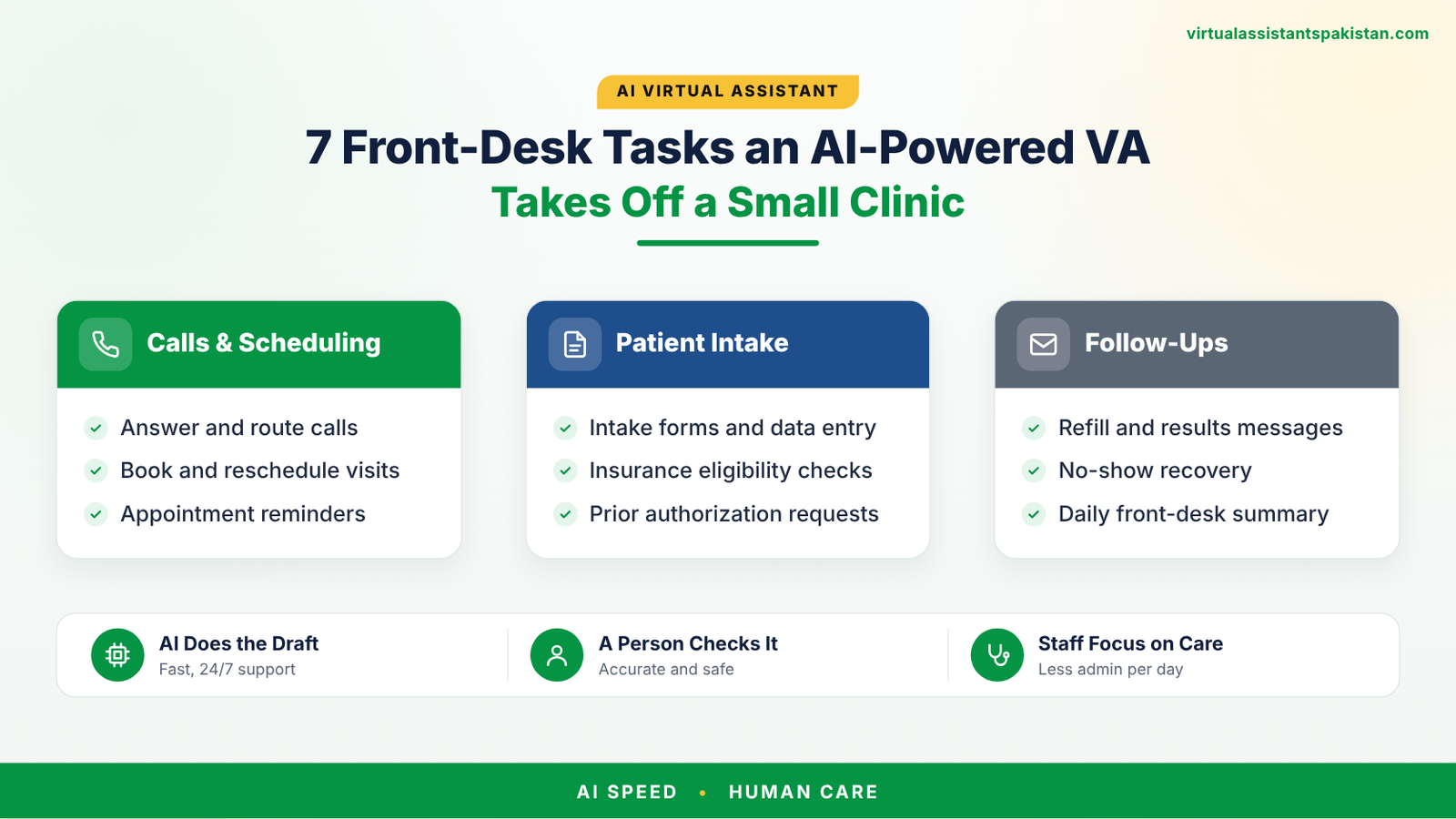
Small clinics lose hours every day at the front desk. The phone rings while someone is checking in a patient, reminder calls pile up, and insurance questions and intake forms never stop. An AI assistant for medical practice work can take a large share of that load, but only when a trained person runs it. That is the idea behind an AI-powered virtual assistant: a human VA who uses AI tools to work faster, while your staff stays in charge of every clinical and patient-facing decision. This guide covers seven front-desk tasks you can hand over, what to keep in-house, and how to stay HIPAA-safe.
There are three ways a small clinic can cover its front desk, and they are often confused. A pure AI receptionist tool answers calls or messages on its own. A human VA does the work manually. An AI-powered VA combines both: the person owns the work and the accountability, and the AI tools handle drafting, sorting, reminders and routine replies. That combination matters in healthcare, because someone has to notice when a message sounds urgent or a schedule does not look right.
$4,500–$6,000 / month
$22–$30 an hour plus payroll taxes, benefits, paid leave and equipment.
Varies by vendor
Often priced per seat, per minute or per call. Needs setup, monitoring and a human for every exception.
$800–$960 / month
$5–$6 an hour for 160 hours. A person who uses AI tools and answers to you.
AI tool pricing differs widely, so ask vendors for quotes. VA rates are our standard rates for full-time work.
The VA books, moves and confirms appointments in your scheduling system following your rules for visit types, provider availability and buffer time. AI tools help sort requests and draft confirmations, so patients get a fast, consistent reply.
Reminder messages go out on a set cadence, and patients who miss a visit get a friendly follow-up the same day. This is one of the quickest wins, because every empty slot is lost revenue.
The VA sends intake and consent forms before the visit, chases incomplete ones and checks that demographics and insurance details are filled in. Patients arrive ready, and your desk stops collecting paperwork at check-in.
Before each visit, the VA confirms coverage and benefits in your payer portal or clearinghouse and flags problems early. If you also outsource claims, see our guide to how to outsource medical billing to Pakistan.
Office hours, directions, forms, prep instructions and refill-request routing are answered from an approved script. Anything that sounds clinical or urgent is escalated to your staff right away, with a script that tells patients with an emergency to call 911.
Referrals go out, records requests get logged and the VA follows up until the paperwork comes back. Nothing sits in an inbox waiting for someone to remember it.
The VA contacts patients who are due for follow-ups and fills cancelled slots from your waitlist. Your schedule stays full without your team making call after call.
For the full job description of the human role behind these tasks, read our medical receptionist job duties guide.
Tell us your specialty, systems and hours. We will match you with an AI-powered virtual assistant for your clinic.
Get a front-desk VA| Metric | What it shows | How to track it |
|---|---|---|
| Missed-call rate | Patients who could not reach you | Phone system report, weekly |
| No-show rate | Visits lost without notice | Scheduling system, monthly |
| Intake completed before visit | How ready patients are on arrival | Share of visits with forms done |
| Cancelled slots refilled | Waitlist and recall performance | Slots filled vs. slots cancelled |
| Reply time to messages | Patient experience | Average time to first reply |
| Escalations handled | Whether urgent items reach staff | Log of flagged messages |
Record your own numbers before the VA starts, then set targets from that baseline.
To see how access works inside your records system, read our post on EHR integration with medical virtual assistants.
Some AI tools can handle routine calls such as hours, directions and appointment requests. They should never handle clinical questions on their own. Set clear escalation rules so urgent or medical questions reach your staff immediately, and confirm the vendor will sign a BAA.
It depends on how you set it up. Any vendor or VA who handles patient data must sign a BAA, and access should be limited and logged. Patient information should not go into public AI tools. Ask your compliance advisor to review your setup.
About $5 to $6 an hour, or roughly $800 to $960 a month full time. A US in-house front-desk employee usually costs $4,500 to $6,000 a month once payroll costs are included.
Yes. The VA logs into your own systems with their own user account, so you keep full control and visibility of what they do.
Plan for two to four weeks. Start with one task, review daily, and add tasks once accuracy is steady.
From $5 an hour, with a signed BAA before any patient data is shared. See our medical virtual assistant services.
See AI virtual assistant servicesWe typically reply in minutes
👋 Welcome! Tell us a little about yourself and we'll help you find the right virtual assistant.
WhatsApp us